
Webpack Instructions (Deprecated)
Webpack architecture
Section titled “Webpack architecture”The Webpack setup follows the same architecture as the Vite one, just with different tools: Webpack is the build tool, and Babel compiles the front-end code into bundle files that are referenced using Django’s static file system.
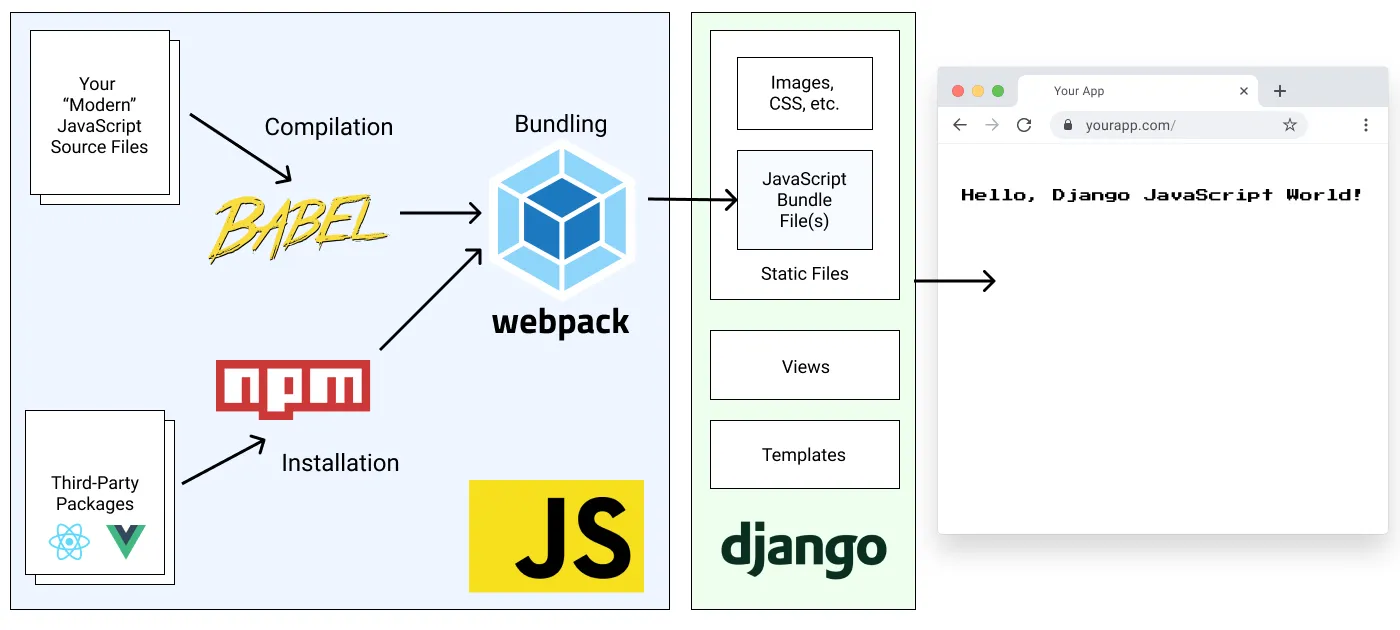
Development with Webpack
Section titled “Development with Webpack”Whenever you make modifications to the front-end files you will need to run the following command to rebuild the compiled JS bundles and CSS files:
npm run devYou can also set it up to watch for changes by running:
npm run dev-watchor in Docker:
make npm-watchBundled Static Files and Source Control
Section titled “Bundled Static Files and Source Control”For ease of initial set up, the front-end bundle files can be optionally included with the Pegasus codebase. This allows you to get up and running with Pegasus without having to set up the Webpack build pipeline.
However, keeping these files in source control will typically result in a lot of unnecessary changes and merge conflicts.
Instead, it is recommended that you add the compiled CSS and JavaScript bundle files to your .gitignore
so they are no longer managed by source control, and have your developers build them locally using the steps above.
You can switch to this workflow by unchecking the “include static files” option in your project configuration.
For production deployment, see the production guidance on this.
Troubleshooting
Section titled “Troubleshooting”Changes are not being picked up when running make npm-watch in a Docker container
Section titled “Changes are not being picked up when running make npm-watch in a Docker container”Some Docker configurations do not properly pick up file-system changes across operating systems. This can be a problem, e.g. when running on certain Windows environments. This causes changes made to not be automatically picked up.
This can be fixed by updating webpack.config.js to use polling by adding this:
module.exports = { //... watchOptions: { poll: 1000, },};Alternatively, you can switch to installing/running NPM natively instead of in Docker. This is a good option if you are also getting poor performance, which can also be caused by cross-platform issues.